100 ChatGPT Slash Commands for Product Photos (Tested, With Real Results)

Short answer: ChatGPT slash commands like /producthero and /miniatureworld are not official OpenAI features. They are one-word prompt shortcuts. You paste a product photo, type the command, and ChatGPT’s image model reads it as shorthand for a whole art direction brief. The four images in this post were made exactly that way — one photo, one word, no editing.

I put a list of 100 of these through a real test instead of just reposting it. Below is the full list, the four commands I actually shot with, the results, and the part nobody tells you: what to do when the command returns something flat.

What a ChatGPT slash command actually is

There is no slash-command menu inside ChatGPT for images. Nothing autocompletes. The command is just a compressed prompt.

When you type /gravitydefying above an uploaded product photo, the model doesn’t look up a stored recipe. It reads a word dense with visual meaning — floating, suspended, mid-air, physics-breaking — and expands it into lighting, camera angle, and composition on its own. That is the whole trick. A single word does the work of a 60-word prompt because the word already carries the reference images the model was trained on.

Which means two things. It works in any image model that accepts text and an image reference, not just ChatGPT. And you can invent your own: any vivid compound noun behaves the same way.

How to use them (the 4-step version)

  1. Upload one clean product photo. Flat lighting and a plain background beat a moody photo here — the model needs to read the product’s shape, not fight your existing lighting.
  2. Type the slash command on its own line. Nothing else. Let it interpret first.
  3. Add one constraint, not five. “Keep the label text exactly as it is” or “vertical 4:5”. One instruction lands; a paragraph of them muddies the result.
  4. Regenerate before you rewrite. These commands have high variance. The second pass is often the one you keep.

The 4 commands I tested, and what came back

/producthero

The command that behaves most predictably. It puts the product on a dark stage with a single warm key light, slight low angle, film-poster framing. Good for anything with metal, glass, or leather — the specular highlights are what sell it.

Gold and leather headphones lit like a film poster, generated with the ChatGPT /producthero command
Input: a plain headphone shot. Output: /producthero added the gold rim light, the haze, and the floor reflection unprompted.

Use it when: you need one strong image and you have no set, no lights, and no budget. This is the safest command on the list.

/gravitydefying

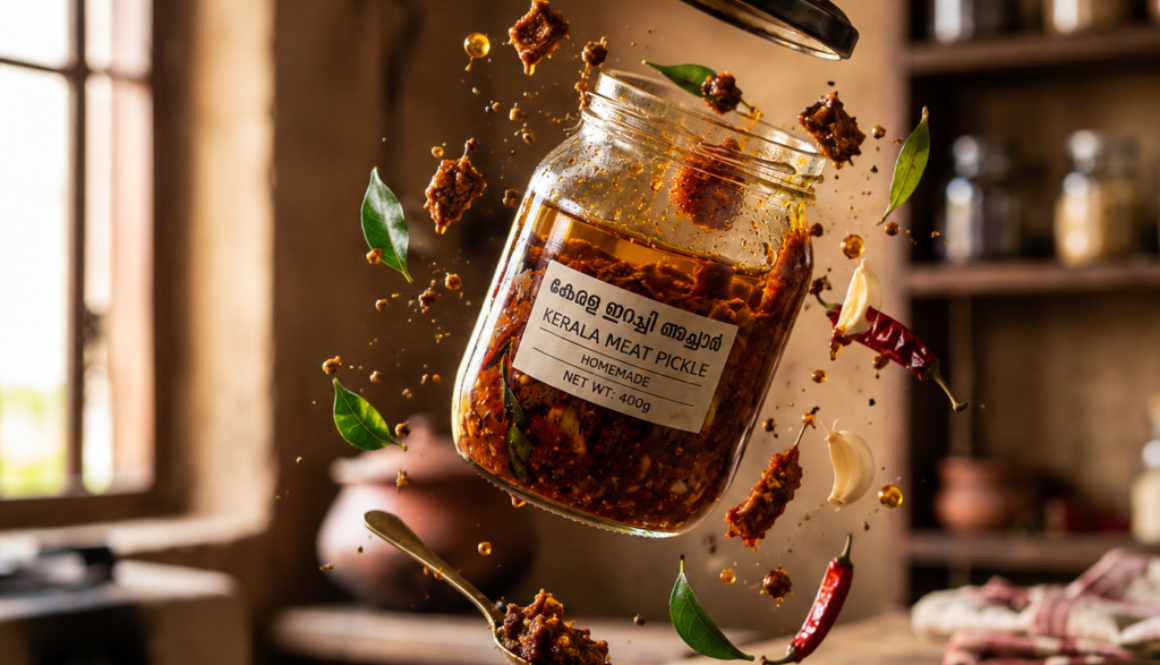
Explodes the product into mid-air with its ingredients suspended around it. It is the single best command for food and drink, because the flying elements do the job that a food stylist normally does — they tell you what’s inside the jar without a word of copy.

Kerala meat pickle jar floating mid-air with spices and curry leaves, made with the ChatGPT /gravitydefying command
/gravitydefying on a pickle jar. The curry leaves, chillies and oil droplets were not in the source photo.

Watch for: label text. Suspended objects tempt the model to redraw the label, and non-Latin scripts get mangled first. Add “do not alter the label” and check every regeneration.

/miniatureworld

Shrinks the world instead of growing the product. You get tilt-shift model-railway scenery with the product as the landmark. It reads as charming rather than aggressive, which makes it the odd one out on a list mostly built for shock.

Two yogurt tubs towering over a miniature model farm, generated with the ChatGPT /miniatureworld command
/miniatureworld built the farm, the cows, the pickup truck and the hand-painted signage around two yogurt tubs.

Use it when: your product has an origin story — farm, ocean, workshop, orchard. The scenery becomes the claim.

/giantproduct

Scales the product up against its environment. Pushed toward a flat-lay it also produces clean feature-callout layouts, which is where it earns its keep — this is a product-page asset, not a scroll-stopper.

Green fleece collar sweater laid out as a labelled feature infographic, generated with the ChatGPT /giantproduct command
The same command, steered toward a layout: headline, feature icons, texture inset, benefit bar.

Watch for: invented text. Every AI model still garbles small type. Treat generated copy as a placeholder and set the real words over it.

The full list of 100 ChatGPT commands

Grouped as they were published. Copy any of them above a product photo.

Billboard and advertising (20)

/3dbillboard /timesquare /gravitydefying /digitalbillboard /giantbillboard /buildingwrap /rooftopadvertising /streetbillboard /highwaybillboard /subwayadvertising /busstopadvertising /mallbillboard /airportadvertising /neonbillboard /holographicbillboard /floatingadvertisement /skyadvertising /citytakeover /billboardillusion /billboard3dreveal

Surreal and gravity concepts (20)

/gravitydefying /levitatingproduct /floatingproduct /zerogravity /productinorbit /fallingproducts /upsideworld /impossiblebalance /giantproduct /miniatureworld /productgiant /shrinkray /groweffect /infiniteproduct /productportal /magicfloating /gravityreverse /floatingcity /impossiblearchitecture /surrealproductworld

Luxury product advertising (15)

/luxurycampaign /premiumshowcase /goldenhour /blackluxury /royalproduct /diamondenvironment /velvetdisplay /luxurytabletop /premiumstudio /cinematicluxury /goldenpedestal /marbleluxury /darkluxury /jewelrycampaign /fashioncampaign

Nature and element concepts (15)

/underwaterproduct /oceanwave /waterexplosion /waterdropworld /icekingdom /firestorm /flameproduct /desertmirage /jungleproduct /forestmagic /cloudproduct /rainforest /snowstorm /volcanicproduct /elementalproduct

Futuristic and sci-fi (15)

/futuristiccity /cyberpunkproduct /hologramproduct /neonworld /spaceshowcase /marsproduct /moonlanding /spaceshipdisplay /roboticshowcase /futuremall /digitalportal /holographicstore /metaverseproduct /virtualshowroom /aiworld

Cinematic and viral concepts (15)

/movieposter /blockbuster /heroicproduct /epicreveal /cinematicexplosion /producttrailer /actionscene /slowmotion /dramaticspotlight /producthero /beforeafter /unexpectedscale /surrealreality /viralproductshot /impossibleadvertisement

Which ones are actually worth your time

Most of the 100 are variations on a handful of ideas. If you only test ten, test these:

Command What it does Best for
/producthero Cinematic hero lighting on a dark stage Anything. Start here.
/gravitydefying Product suspended, ingredients flying Food, drink, cosmetics
/miniatureworld Tilt-shift model world around the product Origin-story brands
/giantproduct Extreme scale against the environment Feature layouts, hero banners
/waterexplosion Frozen splash wrapped around the product Drinks, skincare, fresh goods
/3dbillboard Product breaking out of a digital billboard Launch announcements
/timesquare City-scale takeover in a Times Square set Social proof posts
/hologramproduct Futuristic holographic display Tech and SaaS
/productportal Product emerging through a glowing portal Reveals, countdowns
/unexpectedscale Deliberate scale shock Reels and short-form thumbnails

The four mistakes that ruin these images

1. Feeding it a bad source photo

A dim, cluttered, low-resolution input produces a dim, cluttered output with extra drama on top. The command amplifies what you give it. Shoot the product on a white sheet near a window and you have already won half of it.

2. Stacking commands

/luxurycampaign /firestorm /hologramproduct gives you mud. The model averages the three briefs instead of layering them. One command per generation.

3. Trusting the text

Labels, taglines, price tags — all of it gets invented or misspelled, and non-English scripts break first. Check every word against your real packaging before anything goes out.

4. Using them for everything

Ten surreal images in a row stop being surreal. These work as the interruption in a feed of normal product photography, not as the feed itself. One in five is about right.

Turning them into a video

The format that performs is boring and repeatable: show the original photo for one second, type the command on screen, cut to the result. Three commands per video, worst to best, and let the last one land without a voiceover. The reveal is the content — every second you spend explaining is a second someone scrolls.

Where this stops being enough

A slash command gives you a striking image. It does not give you a reason for anyone to care about the product in it, a consistent look across thirty posts, or a page that converts the traffic once the image has done its job. That is the gap between content that gets saved and content that gets bought from.

If you want the images and the strategy underneath them handled together, that is what I do — see the services page for how the branding, content and SEO work fits together, or start at the homepage for the wider picture.

FAQ

Are ChatGPT slash commands official?

No. They are community-created prompt shortcuts, not OpenAI features. Nothing autocompletes when you type one. They work because the word itself carries enough visual meaning for the model to expand it into a full brief.

Do I need ChatGPT Plus?

You need image generation and image upload, which means a paid tier for any real volume. The free tier will rate-limit you within a few generations, and these commands need regeneration to be worth anything.

Do they work in Midjourney, Gemini or Grok?

Yes, with different results. The mechanism is the word, not the platform. Midjourney leans more stylised; Gemini holds the source product’s shape more faithfully.

Can I invent my own commands?

Yes, and you should. Any vivid compound noun works — /monsoonproduct, /spicemarketstall, /rooftopsunset. If the phrase makes a picture in your head, it makes one in the model’s.

Can I use these images commercially?

Under OpenAI’s current terms you own the outputs and can use them commercially. The risk sits elsewhere: brand names, logos and lookalike faces the model invents into the scene. Check what actually appears in the frame before it goes out.

Where can I find more commands?

There is a longer list in the 300+ ChatGPT image commands guide, which covers portraits, interiors and design styles as well as product work.