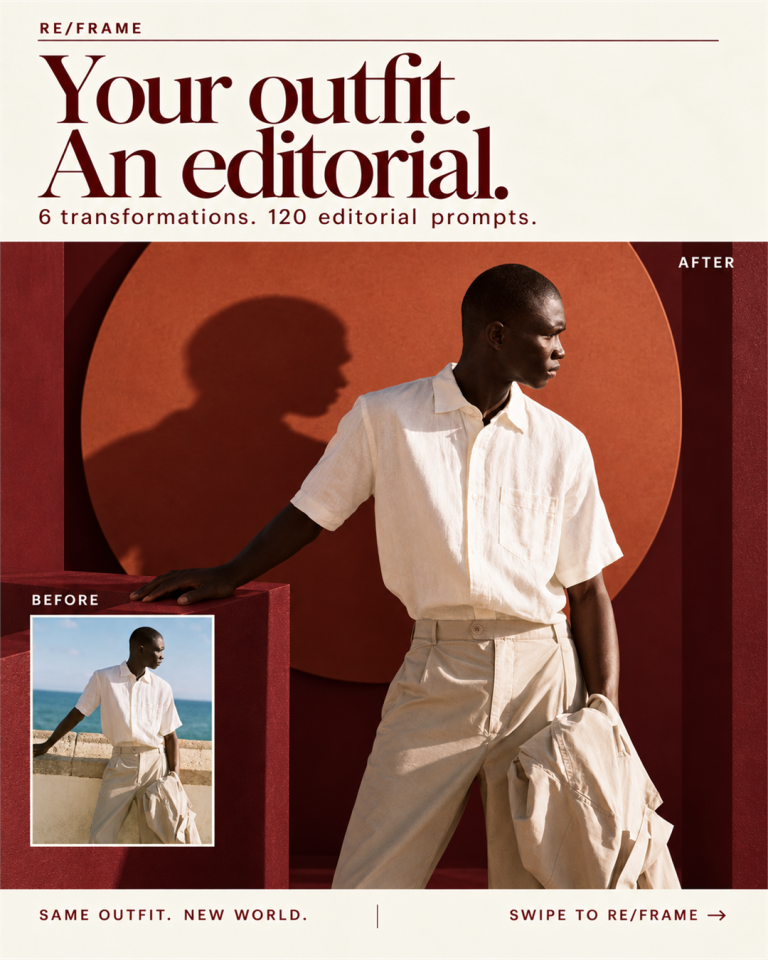
Explore 777 published ChatGPT image-editing codes, with seven before-and-after examples, a click-to-copy library and a free PDF. Start with our photo transformations below, then choose a camera angle, composition, lighting treatment or creative style for your own image.
These are community prompt shortcuts, not official built-in ChatGPT presets. The seven examples used shortcodes plus specific instructions for composition, identity and realism. You can copy either the short combination or the exact full input.
Before & after How to use codes Full code library Common questions
Seven before-and-after photo edits★
Your photo. A new point of view.
777 codes for ChatGPT.★
Seven ways to change a photograph.
Upload your photo, then paste this:
Copy combination
Exact prompt used for this example
Copy full prompt
The shortcodes describe the intended edit. Additional instructions helped preserve identity and photographic realism; code-only results can differ.
1. Go lower. — /LOW ANGLE + /TELEPHOTO
A stronger camera angle. Compare the original and selected result in slide 2. The full generation input is available in the carousel.
Copy this combination
2. Give the place room. — /WideShot + /ruleofthirds + /GoldenHour
A better travel composition. Compare the original and selected result in slide 3. The full generation input is available in the carousel.
Copy this combination
3. Show the whole outfit. — /FullBody + /negativeSpace
Extend the frame. Compare the original and selected result in slide 4. The full generation input is available in the carousel.
Copy this combination
4. Bring the scene closer. — /foregroundframe
Depth through the foreground. Compare the original and selected result in slide 5. The full generation input is available in the carousel.
Copy this combination
5. Catch the movement. — /PANNING SHOT
A photograph in motion. Compare the original and selected result in slide 6. The full generation input is available in the carousel.
Copy this combination
6. Turn up the action. — /SIDECAMERA + /actionshot
A new angle on the moment. Compare the original and selected result in slide 7. The full generation input is available in the carousel.
Copy this combination
For more controlled sets and backgrounds, see our editorial photo prompts with before-and-after examples . For deliberately impossible scenes, explore the separate surreal image prompt collection .
How to use ChatGPT photo editing codes★
Upload a clear photo. Start with a face, outfit or object that is easy to read. The source image guides the edit.Choose the change you actually want. A new angle, wider framing or softer light is easier to judge than a stack of unrelated effects.Click a code to copy it. Paste it into ChatGPT alongside the uploaded image. Join compatible codes with a plus sign.Add what must stay the same. Mention the person’s face, clothing, pose and natural skin texture when they matter.Compare and refine. Check hands, likeness, clothing details, shadows and the background. Ask for a correction if the result misses the intention.
For example, /LOW ANGLE + /TELEPHOTO asks for a lower viewpoint and a longer-lens perspective. The plus sign makes the combination readable; it is not an official command parser. Use the full prompt from an example when you want its specific photographic direction.
Single code or a combination?★
Use one code when it describes the change: /DRONE VIEW for an elevated viewpoint or /foregroundframe for depth through a nearby object. Combine codes when they have different jobs, such as /WideShot + /ruleofthirds + /GoldenHour for framing, subject placement and light. Avoid mixing contradictory viewpoints or many competing styles.
What should you inspect before keeping the result?★
A visibly different result still needs to be a better photograph for your purpose. Look for natural skin, believable hands, recognizable features, consistent fabric and physically plausible light. Expanded views generate details beyond the original crop, including unseen trousers, shoes or surroundings. Do not assume small tattoos, jewelry or garment marks will remain exact.
If your subject is a product rather than a portrait, our product photo command examples show a different set of editing intentions. For illustration and graphic styles, the broader image-command guide is a useful companion.
The 777-code library: click any code to copy★
The first 24 entries below are useful starting points for photographs. Expand the collection for all 777 published names. Search matches the code name, published spelling aliases and the descriptions shown here.
Find a code
24 starting codes · 777 in the complete collection
/LowAngleCopy ↗ Try a lower viewpoint for a stronger portrait.
/droneviewCopy ↗ Explore an elevated view that includes more of the location.
/FullBodyCopy ↗ Extend the crop to show the whole outfit.
/WideShotCopy ↗ Give the person and surroundings more room.
/ruleofthirdsCopy ↗ Place the subject away from the center.
/negativeSpaceCopy ↗ Leave breathing room around the subject.
/foregroundframeCopy ↗ Use nearby objects to add depth.
/PANNING SHOTCopy ↗ Explore motion with a moving-camera photograph.
/TELEPHOTOCopy ↗ Try a longer-lens perspective and compressed background.
/GoldenHourCopy ↗ Explore soft, warm light near sunset.
/IdentityPreserveCopy ↗ Ask to retain the recognizable person.
/NaturalSkinCopy ↗ Ask for natural skin texture.
/FacePreserveCopy ↗ Ask to keep the face recognizable.
/ObjectRemoveCopy ↗ Remove a distracting object.
/BackgroundChangeCopy ↗ Replace the setting while keeping the subject.
/ProfessionalRetouchCopy ↗ Explore a restrained portrait finish.
/PhotoRestoreCopy ↗ Try restoring an older photograph.
/CloseUpCopy ↗ Bring the frame closer to the subject.
/fisheyepovCopy ↗ Explore a curved wide-angle viewpoint.
/RimLightCopy ↗ Add a believable light edge around the subject.
/BlueHourCopy ↗ Explore the cool light around dusk.
/BacklightCopy ↗ Place the light behind the subject.
/SoftLightCopy ↗ Ask for gentler illumination.
/STUDIO BLACKCopy ↗ Explore a simple dark studio background.
Show all 777 codes — expand the full collection
/DSLRCopy ↗
/ProfessionalPortraitCopy ↗
/ExtremeCloseUpCopy ↗
/FullShotCopy ↗
/DroneShotCopy ↗
/AerialShotCopy ↗
/HighAngleCopy ↗
/SideProfileCopy ↗
/PortraitShotCopy ↗
/proshotCopy ↗
/CinematicShotCopy ↗
/cinematicCopy ↗
/epicshotCopy ↗
/FilmStillCopy ↗
/MoviePosterCopy ↗
/EditorialShotCopy ↗
/FashionShotCopy ↗
/StreetShotCopy ↗
/TravelShotCopy ↗
/MirrorselfieCopy ↗
/SelfieCopy ↗
/BirthdayPosterCopy ↗
/PhotorealisticCopy ↗
/UltraRealisticCopy ↗
/SunsetCopy ↗
/StudioLightCopy ↗
/CinematicLightCopy ↗
/RainyCopy ↗
/MistyCopy ↗
/FoggyCopy ↗
/fogCopy ↗
/SnowfallCopy ↗
/CityNightCopy ↗
/NeonCityCopy ↗
/AestheticCopy ↗
/CinematicAestheticCopy ↗
/MoodyAestheticCopy ↗
/LuxuryAestheticCopy ↗
/VintageAestheticCopy ↗
/MinimalAestheticCopy ↗
/DreamyCopy ↗
/PhotoEnhanceCopy ↗
/hdrealCopy ↗
/ColorGradeCopy ↗
/newbgCopy ↗
/BackgroundBlurCopy ↗
/SkinTextureCopy ↗
/SkinToneCopy ↗
/FaceDetailCopy ↗
/FacialDetailCopy ↗
/EyeEnhanceCopy ↗
/EyeDetailCopy ↗
/HairDetailCopy ↗
/HairEnhanceCopy ↗
/NaturalExpressionCopy ↗
/PortraitEnhanceCopy ↗
/PoseEnhanceCopy ↗
/BodyProportionCopy ↗
/OutfitEnhanceCopy ↗
/ClothingDetailCopy ↗
/JewelryDetailCopy ↗
/SharpFocusCopy ↗
/SoftFocusCopy ↗
/DeepFocusCopy ↗
/ShallowDOFCopy ↗
/FocusPullCopy ↗
/CreamyBokehCopy ↗
/MotionblurCopy ↗
/LensFlareCopy ↗
/SunFlareCopy ↗
/LightLeakCopy ↗
/ShadowEnhanceCopy ↗
/HighlightEnhanceCopy ↗
/ContrastBoostCopy ↗
/ColorBoostCopy ↗
/WarmToneCopy ↗
/CoolToneCopy ↗
/TealOrangeCopy ↗
/PastelToneCopy ↗
/DarkToneCopy ↗
/BrightToneCopy ↗
/FilmLookCopy ↗
/FilmGrainCopy ↗
/RetroLookCopy ↗
/BlackAndWhiteCopy ↗
/MonochromeCopy ↗
/SepiaToneCopy ↗
/oldPhoto4KColorRestoreCopy ↗
/droneviewmediumCopy ↗
/magazinecoverCopy ↗
/ds1r85mmbokehCopy ↗
/vintagefilmCopy ↗
/polaroidCopy ↗
/noirCopy ↗
/rainycinemaCopy ↗
/sunsettripCopy ↗
/moonlightCopy ↗
/desertcinemaCopy ↗
/snowstormCopy ↗
/beachvibesCopy ↗
/monsoonCopy ↗
/streetfashionCopy ↗
/luxuryfashionCopy ↗
/denimlookCopy ↗
/traditionalCopy ↗
/weddingeditorialCopy ↗
/festivalCopy ↗
/eidportraitCopy ↗
/newyearCopy ↗
/collegevibeCopy ↗
/officebossCopy ↗
/businessmagCopy ↗
/startupfounderCopy ↗
/artiststudioCopy ↗
/musicianCopy ↗
/rockstarCopy ↗
/rapperCopy ↗
/djCopy ↗
/footballstarCopy ↗
/cricketstarCopy ↗
/basketballCopy ↗
/boxerCopy ↗
/martialartistCopy ↗
/detectiveCopy ↗
/spyCopy ↗
/agentCopy ↗
/explorerCopy ↗
/80scinemaCopy ↗
/90scinemaCopy ↗
/bollywoodCopy ↗
/tollywoodCopy ↗
/bengalcinemaCopy ↗
/vintageindiaCopy ↗
/kolkatastreetCopy ↗
/ruralindiaCopy ↗
/villageCopy ↗
/rickshawCopy ↗
/trainjourneyCopy ↗
/railwaystationCopy ↗
/busjourneyCopy ↗
/roadtripCopy ↗
/motorcycleCopy ↗
/royalenfieldCopy ↗
/carcinemaCopy ↗
/supercarCopy ↗
/racingCopy ↗
/airplaneCopy ↗
/pilotCopy ↗
/parisCopy ↗
/londonCopy ↗
/newyorkCopy ↗
/dubaiCopy ↗
/tokyoCopy ↗
/switzerlandCopy ↗
/maldivesCopy ↗
/baliCopy ↗
/goaCopy ↗
/ladakhCopy ↗
/kashmirCopy ↗
/himalayaCopy ↗
/waterfallCopy ↗
/lakeCopy ↗
/riverCopy ↗
/rooftopCopy ↗
/skyscraperCopy ↗
/nightcityCopy ↗
/rainstreetCopy ↗
/umbrellaCopy ↗
/mirrorCopy ↗
/reflectionCopy ↗
/silhouetteCopy ↗
/shadowplayCopy ↗
/doubleexposureCopy ↗
/lightpaintingCopy ↗
/longexposureCopy ↗
/freezeactionCopy ↗
/windhairCopy ↗
/dustCopy ↗
/neonlightCopy ↗
/spotlightCopy ↗
/studioCopy ↗
/fashionrunwayCopy ↗
/coutureCopy ↗
/suitCopy ↗
/casualCopy ↗
/minimalCopy ↗
/sepiaCopy ↗
/disposablecameraCopy ↗
/polaroidcollageCopy ↗
/scrapbookCopy ↗
/postcardCopy ↗
/anamorphicCopy ↗
/imaxCopy ↗
/hdrCopy ↗
/rawphotoCopy ↗
/fashionflashCopy ↗
/paparazziCopy ↗
/candidCopy ↗
/travelbloggerCopy ↗
/instagramCopy ↗
/reelscoverCopy ↗
/albumcoverCopy ↗
/bookcoverCopy ↗
/posterartCopy ↗
/calendarCopy ↗
/profilepicCopy ↗
/passportstyleCopy ↗
/linkedinCopy ↗
/idphotoCopy ↗
/bestfriendsCopy ↗
/fatherchildCopy ↗
/siblingsCopy ↗
/petportraitCopy ↗
/campingCopy ↗
/bonfireCopy ↗
/stargazingCopy ↗
/picnicCopy ↗
/coffeeCopy ↗
/bookstoreCopy ↗
/libraryCopy ↗
/restaurantCopy ↗
/hotelCopy ↗
/gymCopy ↗
/boxinggymCopy ↗
/skateparkCopy ↗
/concertCopy ↗
/festivalnightCopy ↗
/fireworksCopy ↗
/lanternCopy ↗
/candlelightCopy ↗
/christmaslightsCopy ↗
/fairylightsCopy ↗
/bokehCopy ↗
/slowmotionCopy ↗
/freezeFrameCopy ↗
/beforeafterCopy ↗
/redcarpetCopy ↗
/paparazziflashCopy ↗
/awardnightCopy ↗
/premiereCopy ↗
/fashionweekCopy ↗
/streetportraitCopy ↗
/documentaryCopy ↗
/photojournalismCopy ↗
/editorialCopy ↗
/commercialCopy ↗
/productadCopy ↗
/luxuryadCopy ↗
/perfumeadCopy ↗
/watchadCopy ↗
/sneakeradCopy ↗
/caradCopy ↗
/traveladCopy ↗
/minimaladCopy ↗
/FACEFIXCopy ↗
/Y2KCopy ↗
/FACELOCKCopy ↗
/REALFACECopy ↗
/FACECLEANCopy ↗
/EYEFOCUSCopy ↗
/HAIRSTYLECopy ↗
/HAIRSWITCHCopy ↗
/OUTFITSWAPCopy ↗
/ETHNICWEARCopy ↗
/FESTIVEWEARCopy ↗
/WEDDINGWEARCopy ↗
/ROYALWEARCopy ↗
/KURTASTYLECopy ↗
/SHERWANISTYLECopy ↗
/MODESTSTYLECopy ↗
/SCENESWAPCopy ↗
/PALACESCENECopy ↗
/ROOFTOPSCENECopy ↗
/CAFESCENECopy ↗
/STREETSCENECopy ↗
/GARDENSCENECopy ↗
/BEACHSCENECopy ↗
/LUXURYINTERIORCopy ↗
/OLDTOWNCopy ↗
/FIFTYMMCopy ↗
/WIDEFRAMECopy ↗
/SIDECAMERACopy ↗
/OVERHEADCopy ↗
/CANDIDCAMCopy ↗
/FLASHCAMCopy ↗
/STREETCAMCopy ↗
/GOLDENSUNCopy ↗
/SUNRISEMOODCopy ↗
/WINDOWGLOWCopy ↗
/SOFTDAYCopy ↗
/NIGHTGLOWCopy ↗
/MOONLITCopy ↗
/BACKGLOWCopy ↗
/SIDESHADECopy ↗
/CINELIGHTCopy ↗
/Y2KFLASHCopy ↗
/NINETIESCopy ↗
/EIGHTIESCopy ↗
/RETROCAMCopy ↗
/FILMROLLCopy ↗
/OLDALBUMCopy ↗
/INSTANTCAMCopy ↗
/VINTAGEERACopy ↗
/RETROSTREETCopy ↗
/CINEMAFRAMECopy ↗
/FILMSTORYCopy ↗
/DARKMOODCopy ↗
/SOFTCINEMACopy ↗
/NIGHTCINEMACopy ↗
/ROMANTICFRAMECopy ↗
/DRAMASCENECopy ↗
/QUIETCINEMACopy ↗
/FILMNOIRCopy ↗
/MOVIEMOMENTCopy ↗
/MINIMALLOOKCopy ↗
/QUIETLUXECopy ↗
/EDITORIALSTYLECopy ↗
/OLDMONEYCopy ↗
/SOFTSTYLECopy ↗
/BOLDSTYLECopy ↗
/DARKFASHIONCopy ↗
/CLEANAESTHETICCopy ↗
/RAINSCENECopy ↗
/RAINCITYCopy ↗
/RAINFORESTCopy ↗
/SNOWSCENECopy ↗
/WINTERROADCopy ↗
/MISTSCENECopy ↗
/FOGFORESTCopy ↗
/STORMYCopy ↗
/SUNSETSCENECopy ↗
/MOONSCENECopy ↗
/DESERTTRAVELCopy ↗
/ROYALPALACECopy ↗
/birdsviewCopy ↗
/dutchangleCopy ↗
/OTSCopy ↗
/POVCopy ↗
/wormsviewCopy ↗
/symmetryCopy ↗
/70scinemaCopy ↗
/80sactionCopy ↗
/indiefilmCopy ↗
/chiaroscuroCopy ↗
/practicallightCopy ↗
/windblownCopy ↗
/runningframeCopy ↗
/streetphotoCopy ↗
/mediumformatCopy ↗
/disposablecamCopy ↗
/contactsheetCopy ↗
/throughglassCopy ↗
/35mmCopy ↗
/WORM VIEWCopy ↗
/FISHEYECopy ↗
/NIGHTTIME FLASHCopy ↗
/EYE LEVELCopy ↗
/TOP DOWN PORTRAITCopy ↗
/PROFILECopy ↗
/THREE QUARTERCopy ↗
/OVERHEAD SELFIECopy ↗
/ELEVATOR MIRRORCopy ↗
/CAR SELFIECopy ↗
/PHOTO BOOTHCopy ↗
/HARD FLASHCopy ↗
/SOFTBOXCopy ↗
/RING LIGHTCopy ↗
/WINDOW LIGHTCopy ↗
/REMBRANDT LIGHTCopy ↗
/BUTTERFLY LIGHTCopy ↗
/SPLIT LIGHTCopy ↗
/COLOURED GELSCopy ↗
/PROJECTOR LIGHTCopy ↗
/STUDIO WHITECopy ↗
/ZOOM BLURCopy ↗
/SHUTTER DRAGCopy ↗
/FROZEN ACTIONCopy ↗
/HAIR FLIPCopy ↗
/SPINNING CAMERACopy ↗
/RUNNING SHOTCopy ↗
/RAIN STREAKSCopy ↗
/WIND MACHINECopy ↗
/AERIAL VIEWCopy ↗
/OVER-THE-SHOULDERCopy ↗
/WIDE ANGLECopy ↗
/TILT SHIFTCopy ↗
/SHALLOW DEPTHCopy ↗
/flashphotoCopy ↗
/double shadowCopy ↗
/dramatic shadowCopy ↗
/imageCopy ↗
/photoCopy ↗
/profilepictureCopy ↗
/productphotoCopy ↗
/transparentCopy ↗
/removebgCopy ↗
/editCopy ↗
/realisticCopy ↗
/commercialphotoCopy ↗
/editorialphotoCopy ↗
/lifestylephotoCopy ↗
/studioshotCopy ↗
/professionalphotoCopy ↗
/naturalphotoCopy ↗
/candidphotoCopy ↗
/fashionphotoCopy ↗
/foodphotoCopy ↗
/travelphotoCopy ↗
/birdseyeCopy ↗
/frontviewCopy ↗
/sideviewCopy ↗
/rearviewCopy ↗
/profileviewCopy ↗
/macroCopy ↗
/dynamicCopy ↗
/actionshotCopy ↗
/runningCopy ↗
/jumpingCopy ↗
/speedCopy ↗
/lighttrailsCopy ↗
/watermotionCopy ↗
/motionfreezeCopy ↗
/blurbackgroundCopy ↗
/naturallightCopy ↗
/hardlightCopy ↗
/sunriseCopy ↗
/sidelightCopy ↗
/dramaticlightCopy ↗
/moodylightCopy ↗
/volumetriclightCopy ↗
/ambientlightCopy ↗
/mistCopy ↗
/rainCopy ↗
/snowCopy ↗
/stormCopy ↗
/cloudyCopy ↗
/sunnyCopy ↗
/smokeCopy ↗
/hazeCopy ↗
/morningCopy ↗
/nightCopy ↗
/midnightCopy ↗
/duskCopy ↗
/dawnCopy ↗
/headshotCopy ↗
/ceoportraitCopy ↗
/businessportraitCopy ↗
/corporateheadshotCopy ↗
/linkedinphotoCopy ↗
/passportphotoCopy ↗
/avatarCopy ↗
/influencerphotoCopy ↗
/fashionportraitCopy ↗
/cinematicportraitCopy ↗
/halfbodyCopy ↗
/whitebgCopy ↗
/blackbgCopy ↗
/gradientbgCopy ↗
/luxurybgCopy ↗
/minimalbgCopy ↗
/studiobackgroundCopy ↗
/officebgCopy ↗
/naturebgCopy ↗
/woodbgCopy ↗
/marblebgCopy ↗
/concretebgCopy ↗
/glassbgCopy ↗
/waterbgCopy ↗
/neonbgCopy ↗
/abstractbgCopy ↗
/blurredbgCopy ↗
/bokehbgCopy ↗
/futuristicbgCopy ↗
/premiumbgCopy ↗
/backgroundremoveCopy ↗
/backgroundreplaceCopy ↗
/whitebackgroundCopy ↗
/blackbackgroundCopy ↗
/naturebackgroundCopy ↗
/officebackgroundCopy ↗
/modifyCopy ↗
/removeCopy ↗
/addCopy ↗
/replaceCopy ↗
/recolorCopy ↗
/retouchCopy ↗
/enhanceCopy ↗
/restoreCopy ↗
/cleanupCopy ↗
/sharpenCopy ↗
/upscaleCopy ↗
/cropCopy ↗
/resizeCopy ↗
/rotateCopy ↗
/expandCopy ↗
/extendCopy ↗
/uncropCopy ↗
/relightCopy ↗
/removeobjectCopy ↗
/removepersonCopy ↗
/removeclutterCopy ↗
/removebackgroundCopy ↗
/removetextCopy ↗
/removelogoCopy ↗
/objectaddCopy ↗
/addpersonCopy ↗
/addproductCopy ↗
/addcarCopy ↗
/addbuildingCopy ↗
/addtreeCopy ↗
/addflowersCopy ↗
/addtextCopy ↗
/addshadowCopy ↗
/addreflectionCopy ↗
/addlightCopy ↗
/adddetailsCopy ↗
/transformCopy ↗
/restyleCopy ↗
/reimagineCopy ↗
/redesignCopy ↗
/remixCopy ↗
/fusionCopy ↗
/hybridCopy ↗
/agechangeCopy ↗
/seasonchangeCopy ↗
/weatherchangeCopy ↗
/daytonightCopy ↗
/summerCopy ↗
/winterCopy ↗
/futureversionCopy ↗
/pastversionCopy ↗
/vibrantCopy ↗
/pastelCopy ↗
/neonCopy ↗
/mutedCopy ↗
/duotoneCopy ↗
/warmtonesCopy ↗
/cooltonesCopy ↗
/earthtonesCopy ↗
/highcontrastCopy ↗
/lowcontrastCopy ↗
/focalpointCopy ↗
/compositionCopy ↗
/centeredCopy ↗
/asymmetryCopy ↗
/leadinglinesCopy ↗
/foregroundCopy ↗
/middlegroundCopy ↗
/backgroundCopy ↗
/depthCopy ↗
/perspectiveCopy ↗
/scaleCopy ↗
/proportionCopy ↗
/visualhierarchyCopy ↗
/squareCopy ↗
/portraitCopy ↗
/verticalCopy ↗
/horizontalCopy ↗
/1x1Copy ↗
/4x5Copy ↗
/16x9Copy ↗
/9x16Copy ↗
/4x3Copy ↗
/3x2Copy ↗
/modernCopy ↗
/cleanCopy ↗
/elegantCopy ↗
/referenceCopy ↗
/characterreferenceCopy ↗
/stylereferenceCopy ↗
/colorreferenceCopy ↗
/compositionreferenceCopy ↗
/lightingreferenceCopy ↗
/backgroundreferenceCopy ↗
/identityreferenceCopy ↗
/layoutreferenceCopy ↗
/combineCopy ↗
/mergeCopy ↗
/blendCopy ↗
/multireferenceCopy ↗
/styletransferCopy ↗
/applystyleCopy ↗
/copystyleCopy ↗
/preservelayoutCopy ↗
/preserveidentityCopy ↗
/extractsubjectCopy ↗
/transferbackgroundCopy ↗
/notextCopy ↗
/nologoCopy ↗
/nowatermarkCopy ↗
/noextraobjectsCopy ↗
/nopeopleCopy ↗
/noclutterCopy ↗
/noblurCopy ↗
/nodistortionCopy ↗
/noextradetailsCopy ↗
/nochangesCopy ↗
/preserveoriginalCopy ↗
/preservefaceCopy ↗
/preserveclothingCopy ↗
/preserveposeCopy ↗
/preservecolorsCopy ↗
/preservecompositionCopy ↗
/preservebackgroundCopy ↗
/MINECRAFTCopy ↗
/ANIMECopy ↗
/WEBCAMCopy ↗
/EXPLODED VIEWCopy ↗
/BLUEPRINTCopy ↗
/ANATOMYCopy ↗
/360VIEWCopy ↗
/X-RAYCopy ↗
/CROSS SECTIONCopy ↗
/SCHEMATICCopy ↗
/PATENT DRAWINGCopy ↗
/ORTHOGRAPHICCopy ↗
/ISOMETRICCopy ↗
/WIREFRAMECopy ↗
/ASSEMBLY GUIDECopy ↗
/PARTS LABELLEDCopy ↗
/MATERIAL LAYERSCopy ↗
/SIZE COMPARISONCopy ↗
/SCALE DIAGRAMCopy ↗
/PROCESS DIAGRAMCopy ↗
/SYSTEM MAPCopy ↗
/FIELD GUIDECopy ↗
/INFOGRAPHICCopy ↗
/FLOWCHARTCopy ↗
/TIMELINECopy ↗
/MIND MAPCopy ↗
/CONCEPT MAPCopy ↗
/FLASHCARDCopy ↗
/STICKY NOTESCopy ↗
/NOTEBOOK PAGECopy ↗
/WHITEBOARDCopy ↗
/CHALKBOARDCopy ↗
/SCIENCE POSTERCopy ↗
/CLASSROOM POSTERCopy ↗
/ENCYCLOPEDIA PLATECopy ↗
/STEP BY STEPCopy ↗
/ELECTRON MICROSCOPECopy ↗
/THERMALCopy ↗
/NIGHT VISIONCopy ↗
/INFRAREDCopy ↗
/ULTRAVIOLETCopy ↗
/GHOSTEDCopy ↗
/DECONSTRUCTEDCopy ↗
/SATELLITE VIEWCopy ↗
/TOPOGRAPHICCopy ↗
/HEATMAPCopy ↗
/PRODUCT RENDERCopy ↗
/PACKAGING MOCKUPCopy ↗
/MINIATURE DIORAMACopy ↗
/CLAY MODELCopy ↗
/PAPERCRAFTCopy ↗
/LOW POLYCopy ↗
/PIXEL ARTCopy ↗
/WATERCOLORCopy ↗
/INK SKETCHCopy ↗
/PENCIL SKETCHCopy ↗
/CHARCOALCopy ↗
/RISOGRAPHCopy ↗
/SCREENPRINTCopy ↗
/STAINED GLASSCopy ↗
/NEON SIGNCopy ↗
/COMIC STRIPCopy ↗
/STORYBOARDCopy ↗
/LIFECYCLECopy ↗
/VINTAGE POSTERCopy ↗
/HIGH SPEEDCopy ↗
/SPLIT SCREENCopy ↗
/CENTERED SYMMETRYCopy ↗
/FLAT LAYCopy ↗
/HERO SHOTCopy ↗
/CYBERPUNKCopy ↗
/SOLARPUNKCopy ↗
/BRUTALISTCopy ↗
/ART DECOCopy ↗
/BAUHAUSCopy ↗
/RETRO FUTURECopy ↗
/UNDERWATERCopy ↗
/ZERO GRAVITYCopy ↗
/DESERTCopy ↗
/JUNGLECopy ↗
/ARCTICCopy ↗
/SPACECopy ↗
/ABANDONEDCopy ↗
/LUXURYCopy ↗
/MONUMENTALCopy ↗
/TINY WORLDCopy ↗
/VectorartCopy ↗
/MakeupEnhanceCopy ↗
/GlowEffectCopy ↗
/SoftGlowCopy ↗
/togetherCopy ↗
/hairstylesCopy ↗
/cutawayCopy ↗
/legoCopy ↗
/timemachineCopy ↗
/hologramCopy ↗
/MAKEUPLOOKCopy ↗
/NATURALGLAMCopy ↗
/SAREELOOKCopy ↗
/LEHENGALOOKCopy ↗
/CYBERCITYCopy ↗
/NEONWORLDCopy ↗
/DREAMWORLDCopy ↗
/FANTASYREALMCopy ↗
/GALAXYSCENECopy ↗
/UNDERWATERWORLDCopy ↗
/MIRRORWORLDCopy ↗
/DOUBLESCENECopy ↗
/mediumshotCopy ↗
/productheroCopy ↗
/packshotCopy ↗
/portalCopy ↗
/gravityoffCopy ↗
/miniworldCopy ↗
/centerframeCopy ↗
/neonnoirCopy ↗
/applestyleCopy ↗
/billboardCopy ↗
/editorialadCopy ↗
/beautyshotCopy ↗
/floatingproductCopy ↗
/macroproductCopy ↗
/speedrampCopy ↗
/midairCopy ↗
/impactframeCopy ↗
/jumpcutframeCopy ↗
/collisionCopy ↗
/chaosframeCopy ↗
/impossibleangleCopy ↗
/giantobjectCopy ↗
/dreamlogicCopy ↗
/infiniteCopy ↗
/scaleillusionCopy ↗
/realityshiftCopy ↗
/fashioneditorialCopy ↗
/lookbookCopy ↗
/coverstoryCopy ↗
/BTSCopy ↗
/behindthescenesCopy ↗
/setphotoCopy ↗
/camerarigCopy ↗
/lightingrigCopy ↗
/directorviewCopy ↗
/videovillageCopy ↗
/studiofloorCopy ↗
/makingofCopy ↗
/tinyplanetCopy ↗
/xraystyleCopy ↗
/conceptartCopy ↗
Publication was checked on 8 October 2026. Case, spacing and punctuation aliases are merged for counting. The collection includes photographic, editing and stylized image terms; only the seven featured transformations were tested for this carousel.
Frequently asked questions★
Are these official ChatGPT image codes?★
No. They are published community shorthand. No official image-editing preset registry was found in the documentation reviewed. OpenAI documents image generation and editing through instructions; its app slash commands are a different feature. See the official image generation guide and slash-command reference .
Will a short code reproduce the example exactly?★
No. Image editing is generative. The original photograph, additional instructions and the model’s interpretation affect the output. The carousel exposes the exact full input used for each example so you can see the difference between shorthand and a complete editing brief.
Why are there 777 codes rather than 450?★
The inspected benchmark website contained 414 names. This collection rechecked those names and added 363 distinct published entries. Capitalization, spaces and punctuation variants are merged. The count describes publication, not a test of effectiveness for every entry.
Yes. The PDF button gives you the complete list directly. The “Comment GUN” closing slide belongs to the Instagram carousel; the blog resource is openly available.
What if clicking a code does not copy it?★
The buttons use your browser’s clipboard, with a fallback for browsers that restrict clipboard access. If access is blocked, select the visible code text and copy it manually.